Important legal notice: This content and the frpfile tool are intended for lawful device owners and authorized technicians only. By using the tool or requesting our services you explicitly certify and warrant that you are the lawful owner of the device or are authorized in writing by the lawful owner. frpfile tool does not provide exploit source code or step-by-step instructions for unlawful circumvention. Misuse may result in legal consequences; frpfile tool will cooperate with law enforcement when required.
For iOS 18.7.3 – 18.7.10 and 26.2 – 27.0 please use this tool : https://frpfile.com/hidden-account/
Attention: This method is bypass logout iCloud account for device can access menu (open menu) not turn off Find My Phone. After logout iCloud account you can login other iCloud account. But don’t restore device will lock activation.
If your device does not support FMI OFF open menu. (ask password)
– The Apple ID in the device has been changed password
You can use this sevices for sign out Apple ID without password.
Note:
1. iPhone, iPad must connected to WiFi
2. After Remove Restriction make sure to select “Continue with Partial Setup > Don’t select restore app and data”. After finish you must do Reset all settings: Settings > General Settings > Transfer or Reset iPhone > Reset > Reset all settings.
3. If after Hidden iCloud success, device still show gray Account, please click Block update OTA for fix it.
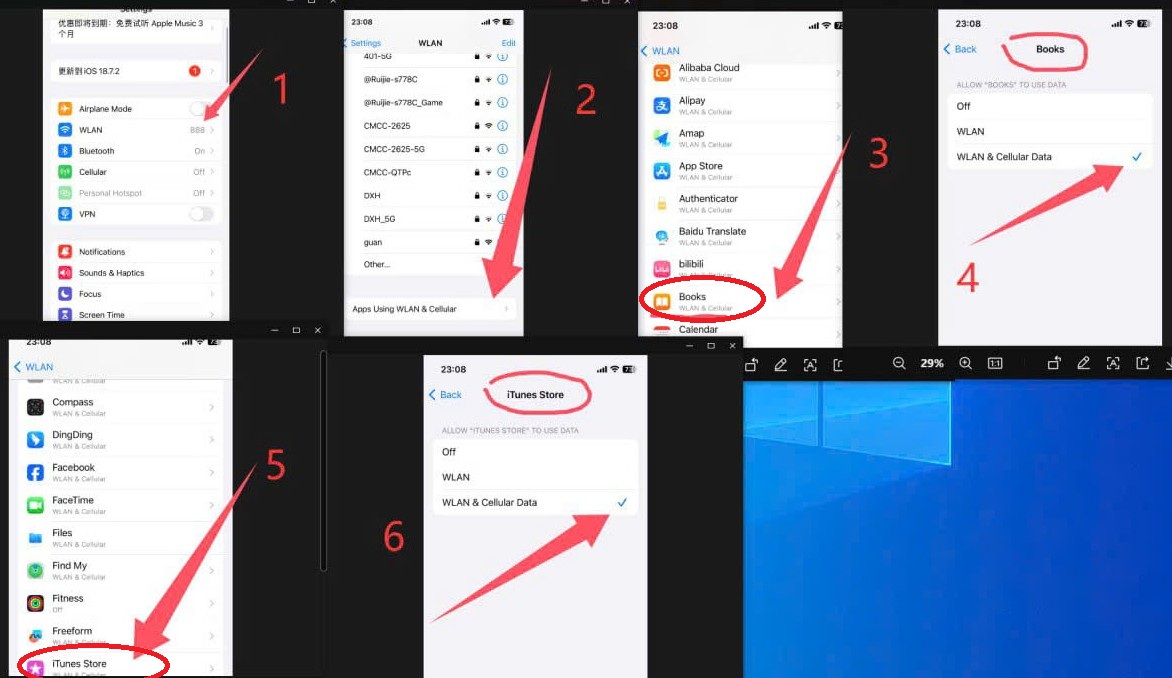
FOR CH/A J/A device please follow this Photo
PRICE
DM me Whatsapp / Zalo : +84948053789 – Telegram : @frpfilecom
DOWNLOAD
VIDEO GUIDE
Video for version tool 1.0.3
Video for version 1.2.1