FRPFILE Mac T2 Activation Tool – Supported Models & User Guide
Legal Notice
Important: FRPFILE Tool is intended exclusively for lawful device owners and authorized repair technicians.
By downloading, using, or requesting support for this software, you confirm that:
- You are the legitimate owner of the device, or
- You have written authorization from the lawful owner.
FRPFILE does not provide exploit source code, unauthorized access methods, or instructions for unlawful security circumvention.
Any misuse of this software may violate local laws and regulations. FRPFILE reserves the right to cooperate with law enforcement authorities when legally required.
Supported Mac Models
The following Apple T2 Security Chip devices are supported:
- MacBook Air Retina 13-inch (2018) – A1932
- MacBook Air Retina 13-inch (2019) – A1932
- MacBook Air Retina 13-inch (2020) – A2179
- MacBook Pro 13-inch (2018) – A1989
- MacBook Pro 13-inch (2019) – A2159
- MacBook Pro 13-inch (2020) – A2251
- MacBook Pro 13-inch (2020) – A2289
- MacBook Pro 15-inch (2018–2019) – A1990
- MacBook Pro 16-inch (2019) – A2141
- iMac Retina 5K 27-inch (2020) – A2115
- iMac Pro (2017) – A1862
- Mac mini (2018) – A1993
- Mac Pro (2019) – A1991
Supported BridgeOS Versions
Compatible with:
iBridgeOS 4.2 – 10.5
Before You Start
If your Mac requires a full restore, please follow our guide:
Apple Configurator for Windows Restore Guide
https://frpfile.com/apple-configurator-windows/
Activation Instructions
Follow these steps carefully:
Step 1 – Enter DFU Mode
Put the supported Mac T2 device into DFU Mode.
Step 2 – Boot Ramdisk
Open FRPFILE Tool and select:
Boot Ramdisk
Wait until the boot process completes successfully.
Step 3 – Activate Device
Click:
Activate T2
Allow the tool to complete the activation process.
Step 4 – Reinstall macOS
Follow the video: https://youtu.be/Om8zIuBM_JE
For Disable Verbose Boot after the bypass process, open **Terminal** and run command:
sudo nvram boot-args=””
Then restart your Mac. This command clears the current boot arguments and restores the standard macOS startup screen.
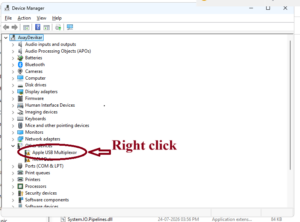
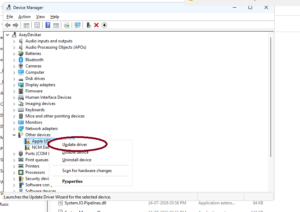
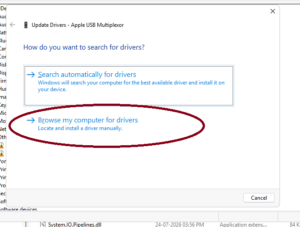
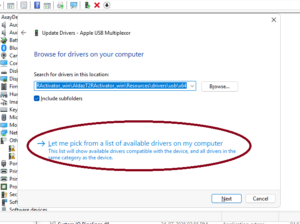
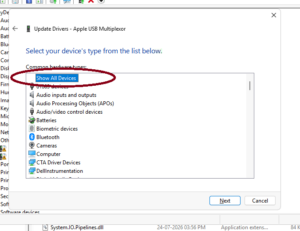
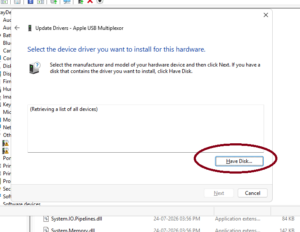
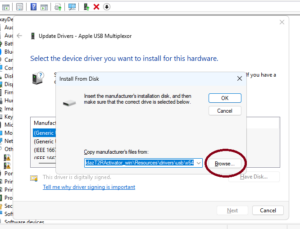
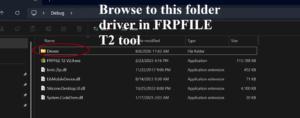
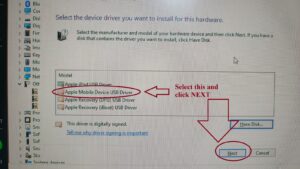
How to install driver manualy
Important After Activation
⚠️ Do NOT reinstall macOS using Apple’s standard Recovery Mode (Command + R will not work).
Download Patched macOS Recovery
Download the patched Recovery DMG:
https://mega.nz/folder/bdcEkAxA#67TqW_i2IHGA6haIhP7uwg
Create Bootable Recovery USB
Flash the downloaded DMG image to a USB drive (The minimum storage capacity is 16GB.) using Balena Etcher:
Balena Etcher is available for both Windows and macOS.
Download FRPFILE Tool
MediaFire
Download:
https://app.mediafire.com/folder/e6b6won0slu6r
Password:
frpfile
Mega.nz
Download:
https://mega.nz/folder/6YVGiAaJ#rwOUXy6fHpenE9mJBUsT8w
Password:
frpfile
Video Tutorial
Watch the complete video guide:
Video for Windows Tool
Video for Mac Tool
Video how to install MAC OS after bypass
Related Tools & Guides
- Bypass Hello Screen iCloud lock no signal Apple A12+
- FRPFILE A5-A6 Activator – bypass hello screen Without Arduino to Owner
- Windows Ramdisk Tool for Passcode Removal
- Untethered Bypass Hello Screen iOS 15 – 16 no Signal (no need change SN)
Visit FRPFILE for the latest updates, tools, and tutorials.