FRP FILE
  • iCloud Bypass
  • APK BYPASS
  • BYPASS
  • SAMSUNG
    • COMBINATION
  • OPPO
  • VIVO
  • HUAWEI
  • NOKIA
  • TOOLS
  • Tutorial
  • DONATE
SUBSCRIBE
FRPFILE
No Result
View All Result

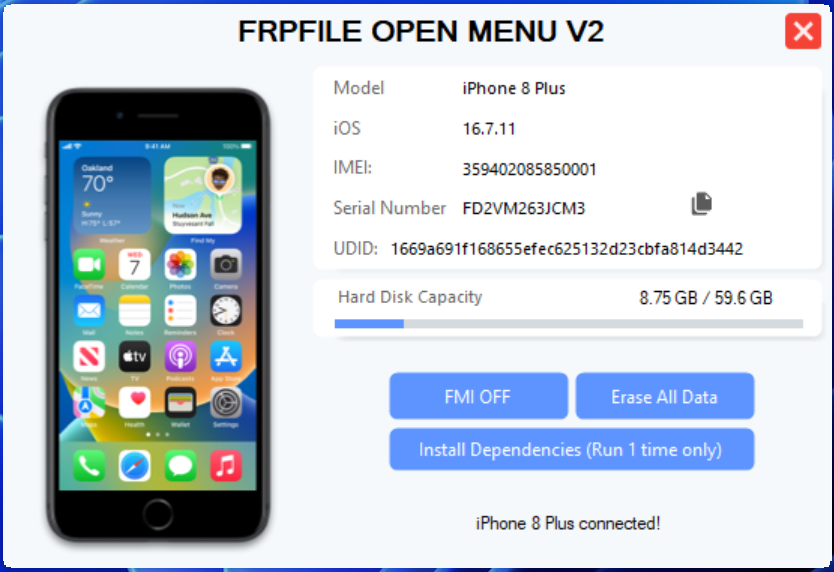
Remove 1 Click Tool FMI OFF OPEN MENU 100% All iPhone, iPad all IOS

Home HOT

Important legal notice: This content and the frpfile tool are intended for lawful device owners and authorized technicians only. By using the tool or requesting our services you explicitly certify and warrant that you are the lawful owner of the device or are authorized in writing by the lawful owner. frpfile tool does not provide exploit source code or step-by-step instructions for unlawful circumvention. Misuse may result in legal consequences; frpfile tool will cooperate with law enforcement when required.

THIS SERVICE IS REMOVAL 100% FOR DEVICES OPEN MENU ALL IPHONE/IPAD ALL IOS SUPPORT.
iOS 18.5+ Support!
Check Support:

1. Set a passcode if the device doesn’t already have one.
2. Visit iCloud.com from Safari > Touch Sign in
3. If you’re prompted with “Continue with Face ID/Passcode” (i.e., device passcode), your device is  100% supported!

NOTE:

  1.  Please remove sim and turn on airplane mode before doing this.
  2.  Disable Windows Defender / Antivirus
  3. Put the folder containing the tool in drive C like C:/FolderTool


PRICE 

  • DM ME WHATSAPP: +84948053789

DOWNLOAD

  • Link Mediafire   password: frpfile
  • Link Google Driver password: frpfile


INSTRUCT

  1. This step is very important: enable Safari Web Inspector. Setting → Apps → Safari → Advanced → Enable Web Inspector
  2. Install Node.js https://nodejs.org/en/download if you haven’t already.
  3. Open Safari on phone go to URL : icloud.com → Open tool → Click FMI OFF → Touch Sign in →”Continue with Face ID/Passcode” (i.e., device passcode) → After Sign in → Turn off WIFI and wait tool process
  4. If tool show error → re open tool → sign out apple id and try again
  5. If tool stuck processing → sign out & sign in apple id again
  6. Check OFF and click Erase All

Video Guide


READ MORE

    • Untethered Bypass Hello Screen iOS 15 – 16 no Signal (no need change SN)
    • Bypass passcode with signal for iPhone, iPad 
    • Bypass Remote management MDM for iPhone & iPad all iOS version.
    • [Windows Tool] Untethered Bypass Activation Lock Macbook T2
    • Turn Off Find My Mac for MacOS Open Menu without password


Tags: how to turn off find my iphone without passwordremove icloud open menu

Related Posts

FRPFILE A5-A6 Activator – bypass hello screen Without Arduino to Owner
BYPASS

FRPFILE A5-A6 Activator – bypass hello screen Without Arduino to Owner

26/05/2026
Bypass Hello Screen iCloud lock no signal Apple A12+
BYPASS

Bypass Hello Screen iCloud lock no signal Apple A12+

19/03/2026
turn off find my mac
HOT

Turn Off Find My Mac for MacOS Open Menu without password

05/11/2025
How to restore macbook with Apple Configurator Windows
HOT

How to restore macbook with Apple Configurator Windows

05/11/2025

Leave a Reply Cancel reply

Your email address will not be published. Required fields are marked *

Facebook Youtube

About me

Share the best!

Categories

  • BYPASS
  • COMBINATION
  • HOT
  • HUAWEI
  • iCloud Bypass
  • NOKIA
  • OPPO
  • OTHER
  • ROM
  • ROOT
  • SAMSUNG
  • TOOLS
  • Tutorial
  • Uncategorized
  • VIVO
  • VN
  • XIAOMI

FRPFILE.COM

Contact

Security Policy

© 2019 FRPFILE.COM Copyright by DANG NGUYEN.

  • iCloud Bypass
  • APK BYPASS
  • BYPASS
  • SAMSUNG
    • COMBINATION
  • OPPO
  • VIVO
  • HUAWEI
  • NOKIA
  • TOOLS
  • Tutorial
  • DONATE

© 2019 FRPFILE.COM Copyright by DANG NGUYEN.